Two AI chat export extensions dominate 2026: Chat2Doc and ChatExport AI. Both promise one-click export from ChatGPT, Claude, Gemini, DeepSeek, and Grok to document formats. The devil’s in the details.
Full disclosure: I built ChatExport AI. I’ll tell you exactly when Chat2Doc is the smarter choice and when it falls short.
Quick verdict
| You want to… | Pick |
|---|---|
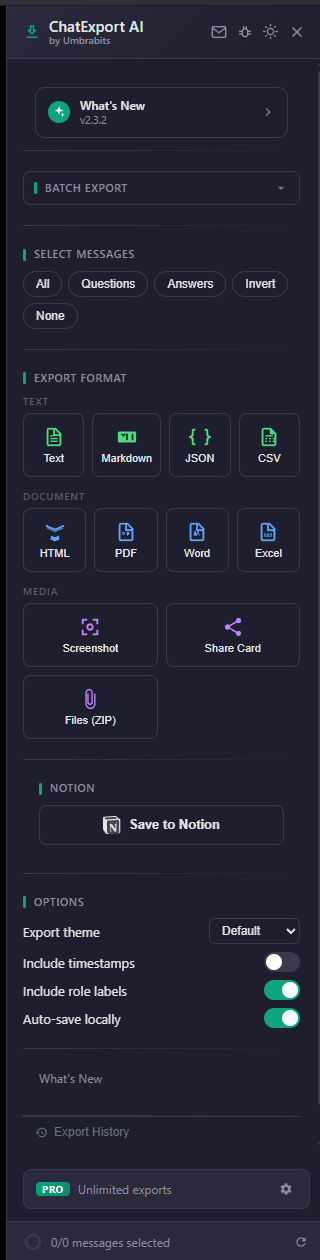
| Export from more than 5 AI platforms | ChatExport AI (45+ platforms) |
| Pick specific messages, not the whole chat | ChatExport AI (free) |
| Send conversations to Notion | ChatExport AI |
| Export entire ChatGPT/Claude projects (all conversations + artifacts) | ChatExport AI Pro |
| Just save a single ChatGPT chat to PDF, no account | Either works |
| Skip account signup entirely | ChatExport AI |
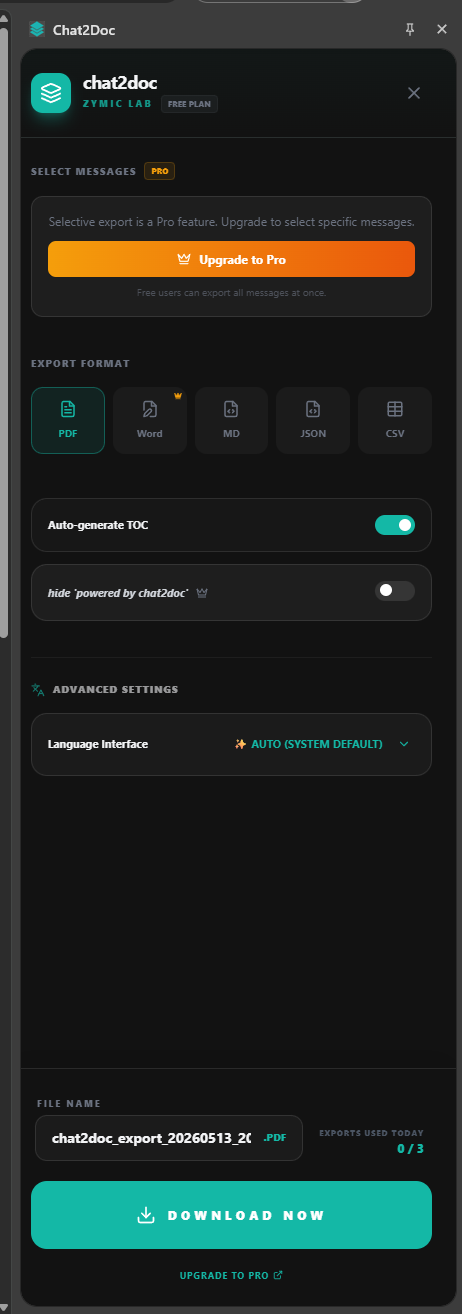
| Auto-generated table of contents in PDF | Chat2Doc |
| Pre-built templates (“Academic”, “Minimal”) | Chat2Doc |
Feature breakdown
Platform coverage
Chat2Doc: ChatGPT, Claude, Gemini, DeepSeek, Grok, 5 platforms total.
ChatExport AI: ChatGPT, Claude, Gemini, DeepSeek, Grok, Perplexity, Copilot, Kimi, Qwen, Yuanbao, NotebookLM, Poe, AI Studio, Google AI Overviews, 45+ platforms supported.
Using only ChatGPT? This won’t matter. Using Perplexity for research or Kimi/Qwen in China? Chat2Doc leaves you stranded.
Export formats
Chat2Doc: PDF, Word (.docx), Markdown, JSON, CSV, 5 formats. Word requires Pro.
ChatExport AI: PDF, Word (.docx), Excel (.xlsx), Markdown, plain text, JSON, CSV, HTML, screenshot PNG, share card PNG, ZIP archive, 11 formats. Word included free.
ChatExport AI writes directly to Notion (zero copy-paste). Excel export turns tabular AI responses into spreadsheets. Both features Chat2Doc doesn’t offer.
Selective export
Chat2Doc: Full conversations only on free tier. Selective message export locked behind Pro.
ChatExport AI: Per-message checkboxes included free. Export questions only, answers only, or specific exchanges. Zero paywall.
This is the biggest functional gap. Long conversations accumulate noise. Exporting only what matters, without paying, is non-negotiable for most workflows.
Account requirement
Chat2Doc: Mandatory sign-up before any functionality unlocks. “Workspace” model gates usage.
ChatExport AI: Zero account requirement. Install, click, export, done.
Allergic to login walls? Decision made.
Project export (ChatGPT Projects, Claude Projects)
Chat2Doc: Not supported.
ChatExport AI Pro: Exports every conversation in a ChatGPT or Claude Project plus every uploaded attachment and AI-generated artifact, packaged as one organized ZIP with manifest.
Organizing serious work into Projects? This is currently the only tool that handles it properly.
Privacy
Both claim 100% local processing. Both deliver on that claim as far as independent testing shows.
Chat2Doc: One server call for Pro license verification. Chrome Web Store privacy declaration lists “Website content”, the extension reads page content (necessary for export, but worth noting). Account model requires your email.
ChatExport AI: One server call for Pro license check (encrypted device fingerprint, no name or email). Privacy declaration covers “Authentication information” only, narrower scope. No account means zero email collection.
Pricing
Chat2Doc: Free with unspecified limits. Pro unlocks Word export and selective export, pricing not publicly disclosed.
ChatExport AI: Free with 5 exports/day. Pro at $5.99/month or $24.99/year for unlimited exports plus full project export. Cancel anytime via LemonSqueezy.
Layout templates and TOC
Chat2Doc: Pre-built “Academic” and “Minimal” templates, auto-generated table of contents, customizable font size and margins.
ChatExport AI: 5 themes (Default, Dark, Academic, Minimal, Colorful), no auto-TOC in current version.
Need auto-TOC for your workflow? Chat2Doc wins this specific battle.
Where Chat2Doc is the right choice
- You only use ChatGPT (or exclusively: Claude, Gemini, DeepSeek, or Grok).
- You always export entire conversations, never subsets.
- You want auto-generated PDF table of contents out of the box.
- You’re comfortable creating an account before using the tool.
Where ChatExport AI is the right choice
- You use multiple AI platforms, especially Perplexity, Copilot, Kimi, NotebookLM, AI Overviews, or Chinese AI models.
- You want to cherry-pick specific messages to export without paying.
- You refuse signup walls on principle.
- You need Notion sync, Excel export, share cards, or ZIP bundles.
- You organize work into ChatGPT or Claude Projects and want complete project exports.
Try them both
Both extensions are free on the Chrome Web Store. Install both, run real exports on real conversations, see which fits your actual workflow. That’s the only test that counts.
Install ChatExport AI, free, no account
For deeper comparisons across the category, see the alternatives page or pick a specific tool: vs Tactiq, vs SaveGPT, vs ChatGPT Exporter (open source).